World map
Network and upSee your world from above with where players spend time, where they quit and your regions drawn on it, in 2D or 3D. Experimental.
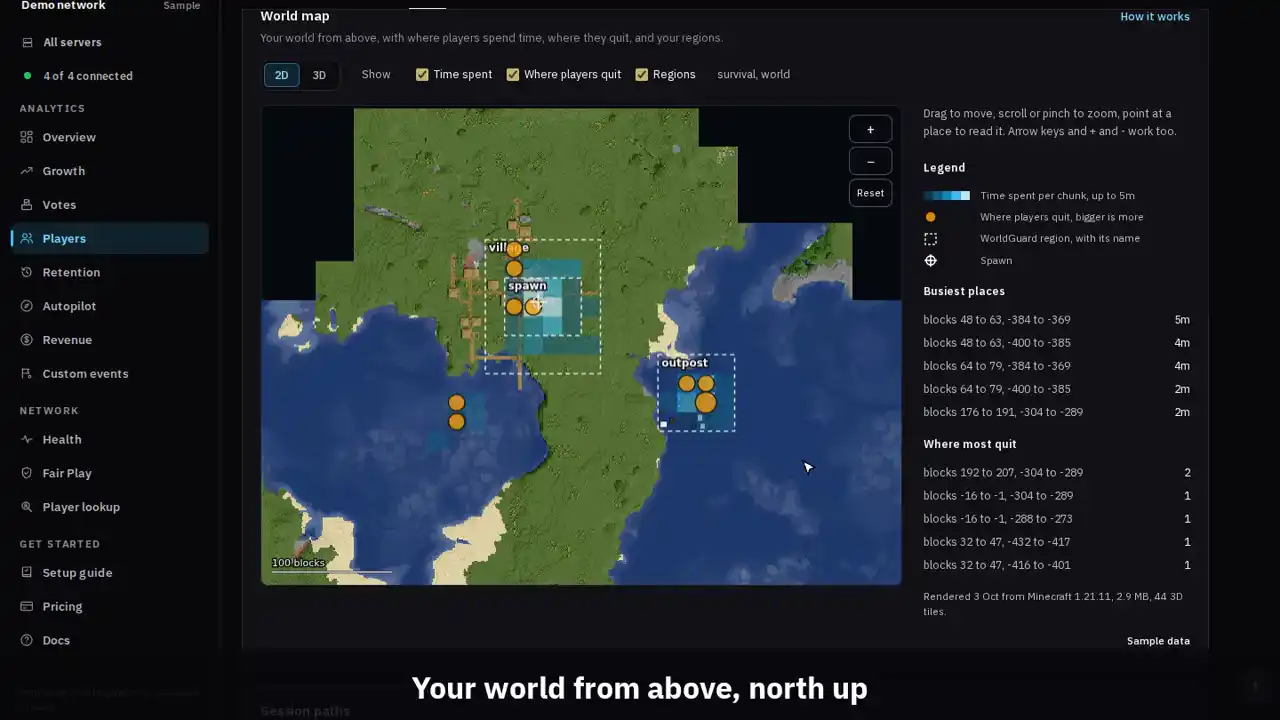
The clip shows, in order:
- Your world from above, north up.
- Point at a place to read it.
- Time spent, quits and regions on the terrain.
- Zoom in and drag around.
- Switch to 3D for the busiest places.
#How it works
The Paper connector has a map renderer built in. It is BlueMap, the open source Minecraft map renderer, so your server installs nothing else.
When the map is on, each Paper server reads its own world files and draws the area around spawn and around the chunks where players spent time in the last 30 days, plus your WorldGuard regions. It draws pictures from above (2D tiles) and, for the busiest places, 3D tiles. Then it sends the tiles to MCAnalytics.
The first render starts a few minutes after you turn the map on. After that the server updates the map once a night and redraws only the areas where blocks changed.
The map has its own page: World map in the sidebar, at /dashboard/map. The Players page keeps the chunk heatmap and links to it.
#The World map page
The page opens on the map for one server and world, with a server and a world picker above it. The range control at the top sets which days the heat and quits on the map come from.
Storage lists every map with its files, its size, its 2D and 3D tile counts, the area it covers and when it last rendered, and the network total against the 500 MB cap. A file two maps share is stored once, so the total can be below the sum of the rows.
Render status lists each Paper server and why it has the map it has: the map is off, the connector is too old, the server is offline, it is waiting for its first render, or when it last rendered. Anything only the server knows, such as a Minecraft version the renderer does not support, shows in /mca status.
Manage, for owners and admins, holds the same switch as Settings, Render now, and Delete map data. Only the owner can turn the map on or off, change the radius or the 3D layer, or delete map data. Admins can ask for a render.
#Turn it on
Open World map, Manage, or Settings, Data and privacy, and switch on Render a world map (experimental). Only the owner of the network can. It needs the Network plan or Unlimited.
Pick how far from spawn the map may reach, from 128 to 4,000 blocks. The default is 1,500. Inside that square only the areas players use and your regions are drawn, so a large radius does not mean a large map.
Keep 3D tiles for the busiest places is on by default. Turn it off for a 2D only map, which is smaller and quicker to render.
Servers need connector 1.0.17 or newer, Minecraft 1.13.2 to 1.21.11 and Java 21 or newer. Minecraft 26 and up needs a newer renderer and is not mapped yet. A server that cannot render says why in /mca status.
#Reading the map
The map opens in 2D, seen from above with north up. Drag to move, scroll or pinch to zoom, and point at a place to read its coordinates, the region it is in, and the time spent and quits in that chunk. Arrow keys and + and - work when the map has focus.
Switch to 3D to fly over the busiest places. Drag to move, right drag or two fingers to turn, and scroll to zoom. 3D needs a browser with WebGL 2.
- Time spent: blue squares, one per chunk, brighter for more time in the range you picked.
- Where players quit: amber dots, bigger for more quits. Zoomed out, nearby chunks are grouped into one dot.
- Where new players quit: red dots for sessions that were a player's first, so you can see where new players give up.
- WorldGuard regions: dashed outlines with the region name.
- Spawn: a white cross in a ring. The Spawn button jumps to it.
- Grid: block lines with their X and Z numbers along the edges.
- Each layer has a checkbox above the map, and your choice is kept in this browser. A layer with no data in the range is not offered. In 3D, the grid, spawn and new player quits are not drawn.
- Go to centers the map on an X and Z you type and marks the spot. A click on a place in Busiest places or Where most quit jumps there too.
#CPU and disk on your server
Rendering never runs on a game thread. It reads the region files on disk on one background thread at the lowest priority, one 32 by 32 block tile at a time. After each tile it rests as long as the tile took, so it uses about half of one core on average.
Before each tile it checks the tick time. Above 40 ms per tick it pauses, and it carries on only after the tick time has stayed at 34 ms or less for ten seconds. Folia has no single tick, so there it watches the process CPU instead and pauses above 85%.
The map folder on each server, plugins/MCAnalytics/world-map, is capped at 400 MB, the Minecraft client download included. Rendering stops at the cap and sends what it has. As a guide, the 2D tiles of a 500 by 500 block area take about 150 KB, and each 3D tile about 50 KB.
Every limit can be lowered in the connector config.yml. The defaults are shown below; each line is optional.
world-map:
  # The most the map folder may hold, in MB.
  max-disk-mb: 400
  # Render threads, 1 or 2, always at the lowest priority.
  threads: 1
  # The share of one core each render thread uses on average, 0.1 to 1.
  cpu-share: 0.5
  # Rendering pauses while a tick takes longer than this, in ms.
  pause-above-mspt: 40
  # The hour of the day, server time, the nightly update starts.
  render-hour: 4
  # The most 32 by 32 block 3D tiles kept per world.
max-3d-tiles: 1500#Storage on MCAnalytics
Each tile is named by a hash of its bytes. Your server first asks which tiles MCAnalytics already holds and sends only the new ones, so a nightly update that changed ten tiles sends ten tiles. Once they are in, one list publishes the new map at once.
A network can store up to 500 MB of map tiles. Uploads past the cap are refused and the map shows what fit. World map, Storage, shows how much each map and the network use.
Tiles are stored on MCAnalytics' own server, in a folder per network, and are shown only to signed in members of that network, on the dashboard. They are never public and never on your own website.
#What we receive
With the map on, we receive rendered pictures of the terrain in the mapped area: what the ground and the builds there look like from above, and in 3D. That can show what players have built. We do not receive the world files, chunk data, signs, chests or what is inside them, or anything about players. The map is drawn from the world as it is, not from who was where.
Which areas get mapped comes from the heat and region data the network already sends. Nothing new about players is collected for the map.
The owner turns the map on, and can turn it off or delete the tiles at any time.
#Turn it off and delete the tiles
Switch Render a world map off under World map, Manage, or in Settings, Data and privacy. At their next heartbeat, servers stop rendering and delete their map folder. The tiles stored on MCAnalytics stay until you delete them, so the map still shows.
To delete the tiles, type delete under Map data and press Delete map data. Every tile MCAnalytics holds for the network is deleted at once, and each server deletes its own copy at its next heartbeat. If the map is still on, it renders again the next night.
Deleting the network deletes its map data too.
#Limits
- Only overworld style worlds are mapped: the main world and any world with heat or WorldGuard regions. The Nether and the End are not mapped yet.
- The map shows the world as it was at the last render, at most a day old.
- This is experimental. If a render fails, /mca status says why and the next night tries again.
| Limit | Value |
|---|---|
| Radius around spawn | 128 to 4,000 blocks, 1,500 by default |
| Disk on each server | 400 MB by default |
| CPU on each server | 1 thread at the lowest priority, about half of one core |
| Pause when a tick takes longer than | 40 ms |
| 3D tiles per world | 1,500 by default |
| Storage per network on MCAnalytics | 500 MB |
| Worlds per network | 32 |
| Updates | Once a night, changed areas only |
| Minecraft versions | 1.13.2 to 1.21.11, on Java 21 or newer |