Heatmaps and session paths
Network and upMap where players spend time and where they quit, one chunk at a time, and see which servers they move through before they leave.
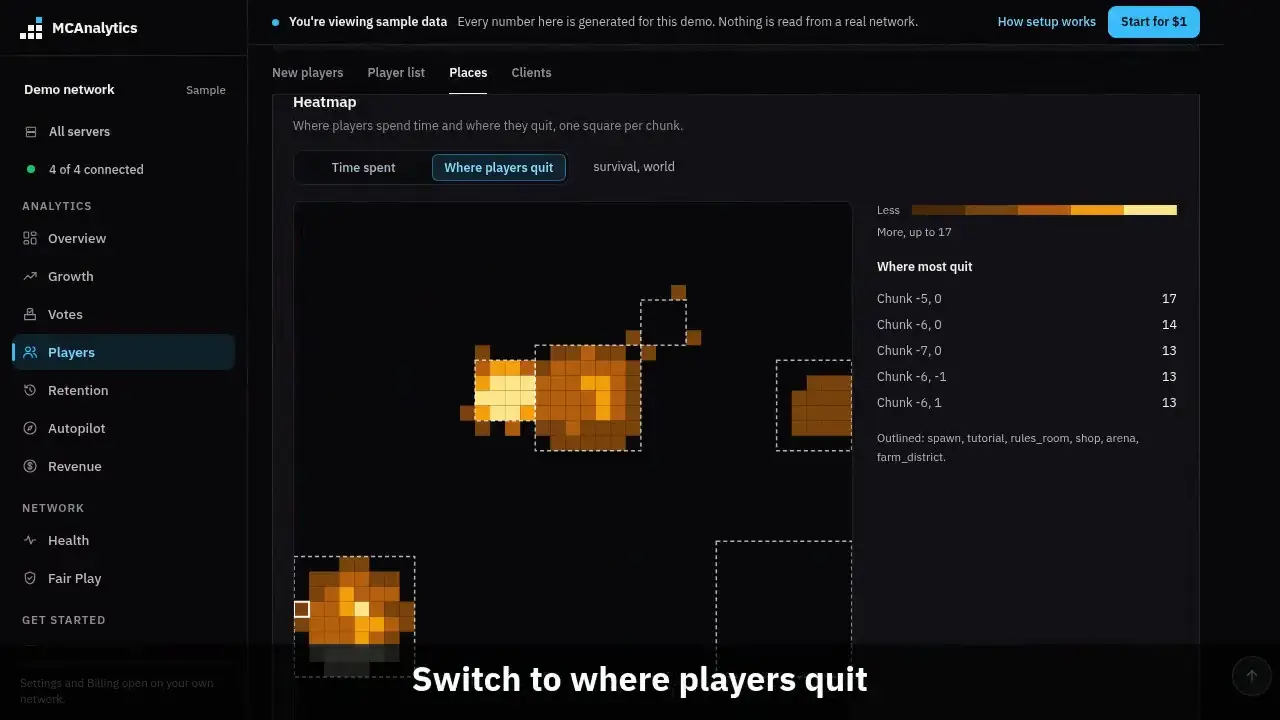
The clip shows, in order:
- One square per chunk, north up.
- Point at a square to read it.
- Switch to where players quit.
- Dashed outlines are WorldGuard regions.
- Session paths across your servers.
- The last server before they leave.
#How it works
Every 10 seconds, each Paper server notes which chunk every online player stands in. A chunk is 16 by 16 blocks. Once a minute it sends one count per chunk: how many looks landed there, and how many different players it has seen there today. It never sends a block position.
When a player leaves a Paper server, it also sends the chunk they were in. If their network session ended right then, that chunk counts as where they quit.
A Velocity proxy notes every backend server a player connects to, in order, with the time. When the session ends it sends that route once.
Both cards are on the Players page, in the Places group, on the Network plan and up.
#Set it up
Run connector 1.0.15 or newer on your Paper servers for the heatmap, and on your Velocity proxy for session paths. Heat sampling is on by default. There is nothing to switch on in MCAnalytics.
To change the sample rate or turn sampling off, edit the connector config.yml on the Paper server and restart.
heatmap:
  # Note which chunk each player stands in. Set to false to stop.
  enabled: true
  # Seconds between two looks at the same player, 5 to 300.
sample-seconds: 10#The heatmap
The map shows one server and one world at a time, north up. Pick another one with the links above the map. Each square is a chunk, and a brighter square means more.
- Time spent: player time in the chunk over the range. Ten seconds per look, so it is close, not exact.
- Where players quit: sessions that ended with the player in that chunk. Point at a square to see how many of those were a first session.
- WorldGuard regions are drawn as dashed outlines when the server has WorldGuard 7, so you can tell spawn from the shop at a glance.
- When players spread far out, the map shows a 64 by 64 chunk square around the busiest spot and says how many chunks it left out.
#Session paths
The card shows where sessions land first, the most common moves from one server to the next, and the last server players were on before they left the network. Below that are the most common full routes, like lobby, then skyblock, then left.
A session counts on the UTC day it ended. Two visits in a row to the same server count as one step. A proxy on an older connector still shows moves, from its server switches.
#What is stored
The heatmap is stored per chunk, per server, per world and per day. It does not say which player stood where. The only position tied to a player is the chunk they were in when they left a server, kept for 35 days so quits can be counted, then deleted.
Routes are stored as daily counts of server to server moves and the top routes. The raw route of each session is kept 35 days, then deleted.
#Limits
- Past 20,000 chunks in a day, new chunks are not counted that day. Chunks already on the map keep counting.
- The players count is a floor. It resets when the server restarts, so a restart mid day can show fewer players than there were.
- Quits and routes are rebuilt every hour. Time spent shows within a few minutes.
- A plan below Network does not store heat. Quits and routes come from session events every plan sends, so they show after an upgrade.
| Limit | Value |
|---|---|
| New chunks per network per day | 20,000 |
| Chunk days kept | 90 days |
| Region outlines per network | 500 |
| Server to server moves kept per day | 500 |
| Full routes kept per day | Top 50 |
| Route length the proxy sends | 16 servers |
| Daily route counts kept | 400 days |