Lag profiling with Spark
Network and upSee when a Paper server lagged, how bad it got, and open a Spark report of what the server was doing while it happened.
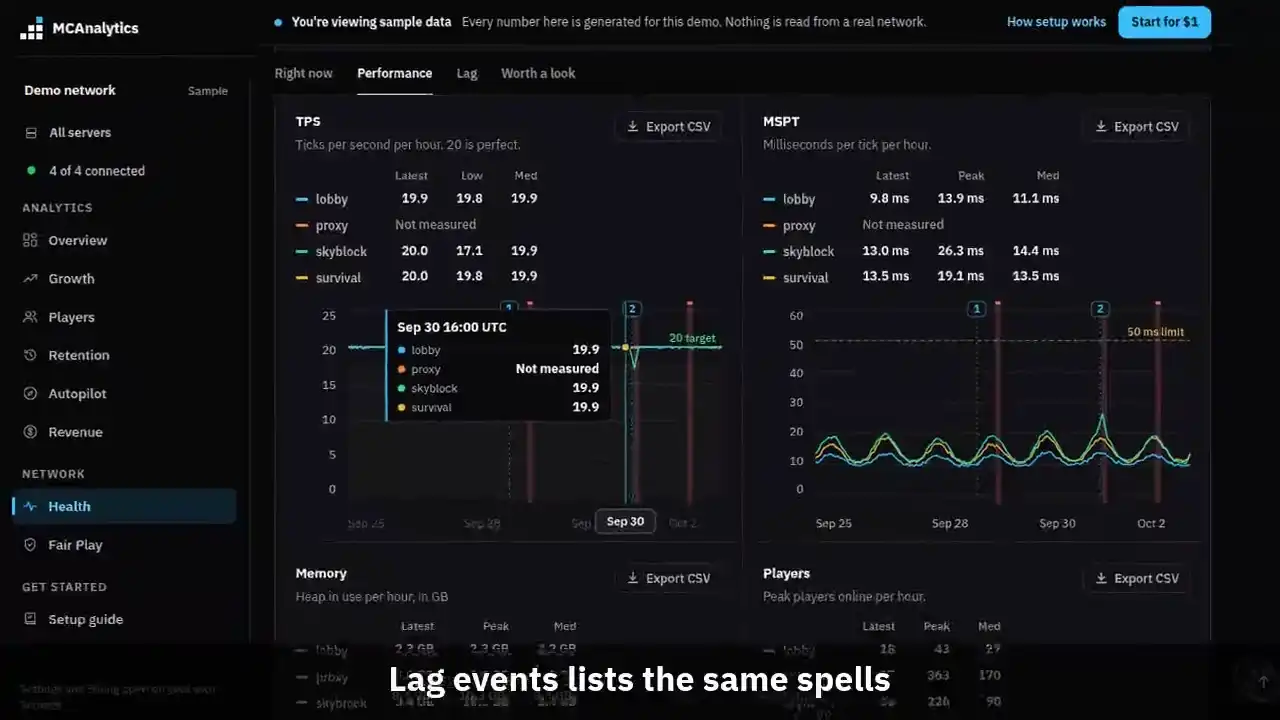
The clip shows, in order:
- Under 18 TPS or over 50 ms for 30 seconds.
- Each lag spell is a red column.
- Lag events lists the same spells.
- Sort by duration or players online.
- Open Spark report shows where time went.
- Does lag cost returning players?.
#What starts a profile
Lag profiling is off until the owner of the network switches it on in Settings, under Integrations. It needs the Network plan or Unlimited, and connector 1.0.13 or newer on the Paper server.
A profile starts when a Paper server stays past either limit for 30 seconds without a break. A single slow tick never starts one.
- TPS under 18. A server at 20 is perfect, and under 18 players feel every tick.
- MSPT over 50 ms. A tick has 50 ms to finish, so over that the server cannot keep up.
#Rate limits
Profiling has a cost of its own, so it is kept small. The connector enforces the limits below, and a spell that arrives after the allowance is used up is not reported at all. MCAnalytics adds a check of its own: one server can save ten events with a Spark link in a rolling day, and an eleventh is refused.
| Limit | Value |
|---|---|
| Between two profiles on one server | 30 minutes |
| Profiles per server per day | 10 |
| Lag that must last before it counts | 30 seconds |
#What Spark shares
Spark uploads each report to spark.lucko.me as a link anyone with it can open. It lists your plugins and some config. Treat the link like a document you have not decided to publish.
MCAnalytics saves the link and the lag numbers: the server, the start and end, the lowest TPS or the slowest tick, and how many players were online. It does not fetch, copy or store the report.
Switch the setting off and no new profile starts once servers read it on their next heartbeat. Reports already uploaded stay on spark.lucko.me under their links, and you cannot pull them back from here. Ask Spark's own service if you need one removed.
#Paper 1.21 or the Spark plugin
Paper 1.21 and newer ships Spark built in, so there is nothing to install. On an older Paper version, install the Spark plugin from its own site and start the server once.
Spark has no public call to start a profiler, so the connector runs the Spark profiler command from the server console and reads the link out of what Spark prints. It never waits for that on the main thread.
If Spark is not there, the lag event is still recorded, just without a report. The row on Lag events reads No report, and installing Spark fixes it for the next event.
#How to read it
On Health, each lag event is a red column on the TPS and MSPT charts. Hover it, or drag a finger across it on a phone, for the time, how long it lasted, the lowest TPS or the slowest tick, and how many players were online.
The Lag events card lists the same events. Sort by duration to find the worst, or by players online to find the ones that cost the most. Open Spark report opens the report on spark.lucko.me in a new tab, and Export CSV saves the table.
In a Spark report, open the Server thread. It is the one that runs ticks. Follow the widest branches down: the plugin or the game system named on a wide branch is where the time went. A wide branch under one plugin is that plugin. Wide branches under the game itself, such as entities or chunks, point at the world.
The Lag and 7-day return card compares new players whose first session overlapped a lag event with every other new player of the same period. The period is the range moved back 7 days, so every player in it has had their 7 days, and the card names its dates. On 1 hour and 6 hours it uses the last 24 hours moved back 7 days. It shows the two return rates and the gap in points once each group has 30 players. A gap is a lead, not proof, because lag tends to land in busy hours.