Track creator and sponsor ROI for your Minecraft server
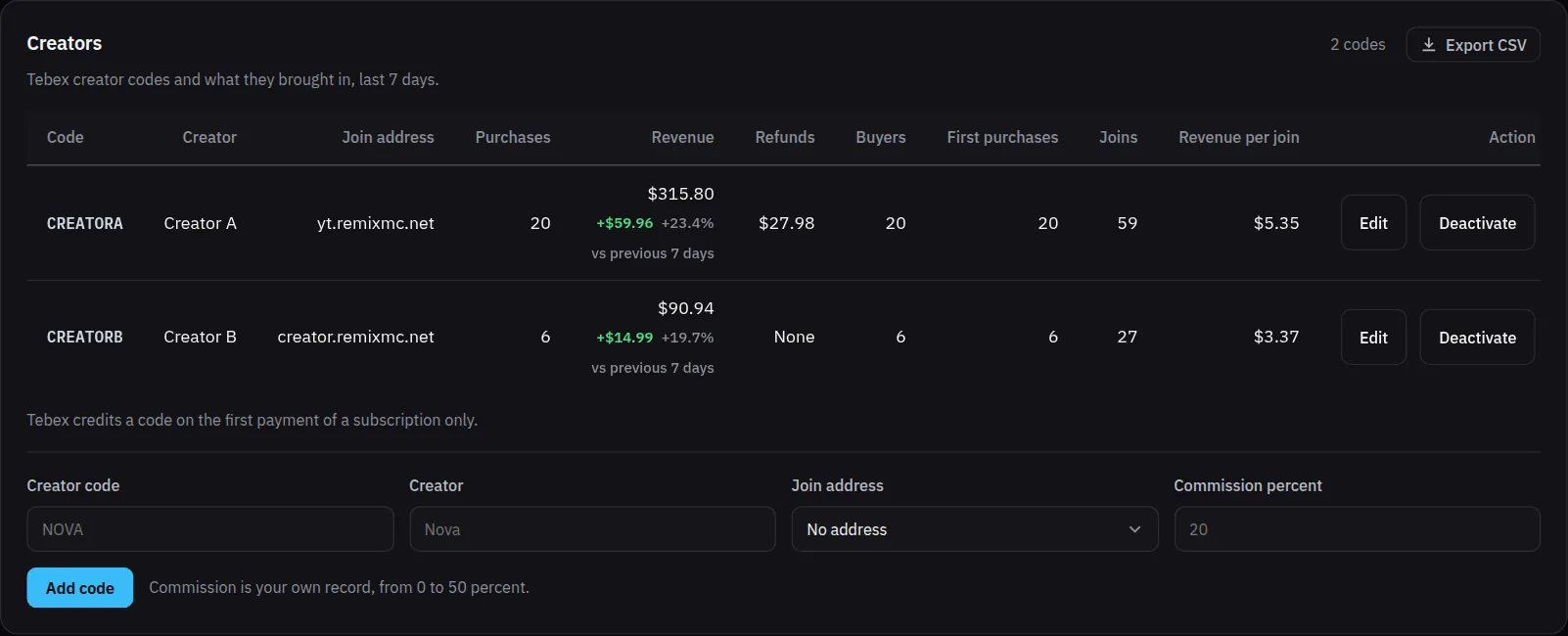
Give each creator or sponsor their own join address and register their Tebex creator code in MCAnalytics. The Creators card then puts what they brought on one row: the players who first joined through their address, the purchases made with their code, revenue, refunds, buyers and revenue per join. Put that next to what you paid them and you can see who earned their fee. A sponsor or ad without a code still gets its own address, with its new players, 7-day returns and the Tebex revenue those players spent.
How it works
Give them an address
A subdomain such as yt.yourserver.net pointing at your proxy. The creator puts it in the video description or says it on stream.
Add their Tebex code
Create the code in the Tebex panel under Creators, then add the same code on Growth and link it to the address that creator promotes. You can note the commission you agreed.
Purchases carry the code
The Tebex webhook sends the creator code with each payment. Codes are trimmed and read in upper case, so nova and NOVA are one creator.
Compare the rows
Joins, purchases, revenue, refunds, buyers, first purchases and revenue per join, with the change against the period before.
What you see on the dashboard
Creators card
One row per code with the creator, the address they promote, purchases, revenue, refunds, buyers and first purchases.
Revenue per join
Revenue under the code divided by the players who first joined through the creator's address, so a small creator with a loyal audience is not buried by a big one.
Unregistered codes
Codes used at checkout that you never added are grouped on a row of their own, so no revenue goes missing.
Export CSV
Take the table into a spreadsheet when it is time to pay creators.
The address and the code answer different questions
The address tells you who a creator brought to the server: first joins, returns, and what those players spent, whenever they spent it. The code tells you which purchases were made with the creator's code at checkout, including buyers who joined through your main domain.
MCAnalytics shows both and never adds them together. It does not know what you paid a creator, so it prints the return side and leaves the fee to you rather than inventing a return on spend. Tebex credits a creator code on the first payment of a subscription only, and the card says so.
Questions
Do I need both a join address and a creator code?
No. An address alone gives you new players, 7-day returns and the revenue of the players it brought. A code adds the purchases made with it at checkout. Together they give the fullest picture.
What if a buyer uses a creator's code but joined through another address?
The purchase counts on the code's row, and the player's revenue still counts on the address they first joined through. The two views are kept apart, so nothing is counted twice inside either one.
Does it work for sponsors and ads without a code?
Yes. Give the sponsor or ad its own address. Growth shows its new players, 7-day return rate and Tebex revenue next to every other source.
Are subscription renewals credited to the creator?
Tebex credits a creator code on the first payment of a subscription only, so renewals do not carry the code.
Does MCAnalytics work out the ROI for me?
It gives you the return side: revenue, buyers and revenue per join for each creator. It does not know what you paid, so compare the row with the fee or commission you agreed.