Track where your Minecraft players come from
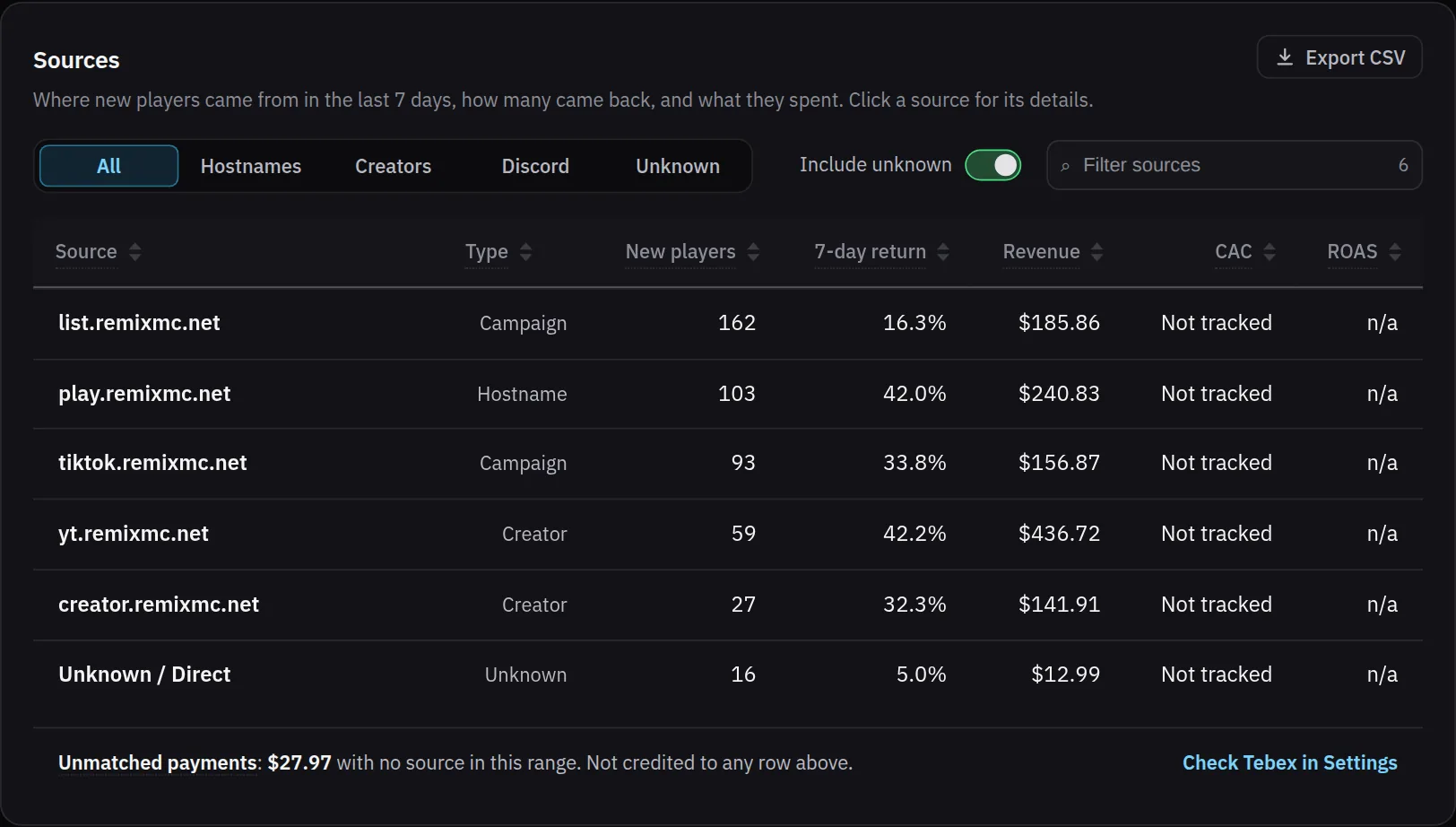
Give every creator, server list and ad its own join address, such as yt.yourserver.net, all pointing at the same proxy. The address a player types travels in the Minecraft handshake, so the MCAnalytics connector on your Velocity proxy reads it and credits the player to that address on their first join, for good. Growth then lists each address with its new players, how many came back within 7 days, and what they spent in Tebex. There is no tracking link, no cookie and no pixel: the address is the campaign.
How it works
Make one address per source
Add a DNS record for each creator, list or ad: a CNAME to your main address, or one wildcard record for all of them. Nothing changes on the proxy.
Players type it to join
The client sends the typed address in the handshake. The connector on Velocity reads it, or the Paper connector on a server that players join directly.
The first join decides
The first session ever recorded for a player writes their source. Joining later through another address does not move them, and a join with no address goes to Unknown instead of a guess.
Compare sources on Growth
Every address gets the same numbers: new players, 7-day return rate and Tebex revenue, so a small creator and a big server list are judged by one rule.
What you see on the dashboard
Sources table
Each join address on one row with its type, new players, 7-day return rate and revenue, for 24 hours, 7, 30 or 90 days.
Addresses appear on their own
A new address shows up after its first join. Label it or mark your main domain in Settings, with nothing to register in advance.
Unknown stays visible
Players who arrived without a readable address are grouped as Unknown, so the rows still add up to your total.
Filter and export
Show hostnames, creators, Discord or Unknown on their own, open a source for its details, and export the table as CSV.
Why the first join, and not the last
A player who found you through a creator and later types your main domain is still that creator's player. Crediting the first join counts every player once, under one source, and a source's numbers never change after the fact.
It has limits worth knowing. A player who saw a video but typed your main domain anyway is credited to the main domain. An address only works when the creator or list actually shows it, so give each one a name that is short and easy to type.
Questions
Do I need a new IP or a new server for every address?
No. Every address points at the same proxy, through a CNAME record or one wildcard record. The proxy needs no change, and the connector reads whichever name the player typed.
What if a player joins through two different addresses?
The first one counts, for life. Later joins through another address are still recorded as sessions, but the player stays credited to the source that brought them first.
Does this work on a single server without Velocity?
Yes. On a Paper or Purpur server that players join directly, the connector runs in standalone mode and reads the address itself. Behind a proxy, install it on the proxy, because a backend server never sees the address the player typed.
Do players have to click a tracking link?
No. There is no link, cookie or pixel. The player types an address into the Minecraft client the way they always do, and that address is the campaign.