Paper, Purpur, Folia and Spigot setup
BackendInstall the connector on backend servers for heartbeats, in game events, confirmed bans, and login confirmation.
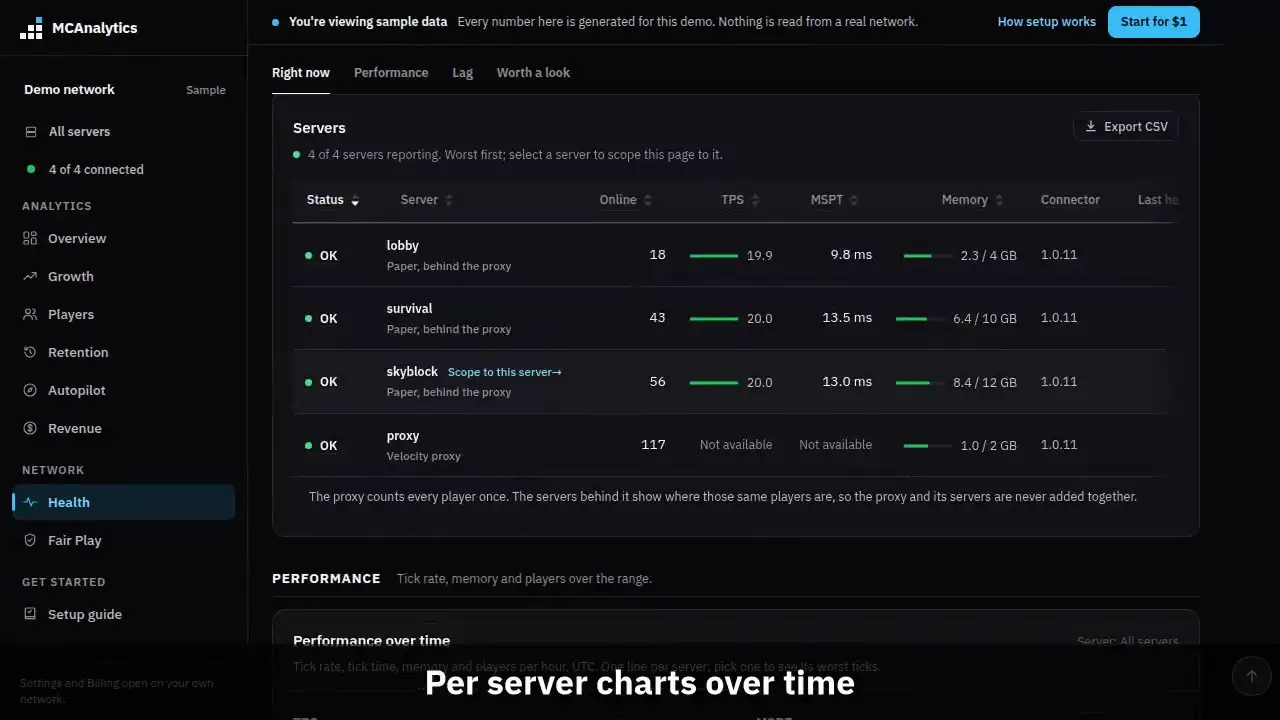
The clip shows, in order:
- Install the Paper loader, set the mode.
- Pair from the server console.
- Health shows TPS, MSPT and memory.
- Per server charts over time.
#When to install on Paper
Behind a proxy the Velocity or BungeeCord connector already handles hostname attribution and sessions. Adding the Paper connector gives you per server health, confirmed cheat bans, and login confirmation for cracked players.
Without a proxy, the Paper connector does everything on its own.
#Supported versions
One jar covers Paper, Purpur, Folia and Spigot, 1.20 and newer. It is built for Java 17, so it runs wherever your server's Java runs.
Folia ticks every region on its own, so a Folia server has no single TPS or MSPT. Its heartbeat sends online players and memory, and Health shows Not available for the tick numbers rather than a made up value. The connector finds Folia at startup and reads players and worlds only on the thread that owns them; the Folia page lists what runs where.
Purpur is built on Paper and runs the same jar. It runs on live networks today, though it is not in our automated test runs, so tell us on Discord if something behaves differently there.
Spigot runs the same jar too. Spigot does not report TPS, so the connector measures it itself, and it has no MSPT or client brand to read, so Health shows Not available for MSPT and sessions carry no brand. A vote from a player who is offline is sent without a player match. Everything else works as on Paper, and the console says this in one line at startup.
| Platform | Versions we test on |
|---|---|
| Paper | 1.20.1, 1.20.4, and 26.3 |
| Folia | 1.20.4 and 26.2 |
#Deployment modes
| Mode | Use it when | What it sends |
|---|---|---|
| auto | You are not sure | Backend when Velocity forwarding or BungeeCord mode is on, standalone otherwise |
| backend | The server sits behind a proxy that runs the MCAnalytics connector | Heartbeats, in game events, confirmed bans, and login hooks. Sessions come from the connector on the proxy, so it needs that connector |
| standalone | Players join this server directly, or through a proxy without MCAnalytics | Sessions and hostnames as well as the above |
#Configuration reference
The config file is plugins/MCAnalyticsLoader/config.yml.
# Connect from the console: mca pair <code>
# MCAnalytics always connects to https://mcanalytics.org.
# There is no address to set.

server-name: "paper-server"
deployment-mode: "auto"   # auto | backend | standalone

# Off by default. When on, the API stores only a keyed hash.
track-ip-address: false

debug: false

# Update the loader jar by itself (loader 1.0.5 and newer). A verified
# newer loader goes to plugins/update and is used after the next restart.
# Set to false to update the loader by hand.
auto-update-loader: true#Login plugin hook
On a network that runs nLogin for its cracked players, the connector waits for a confirmed login before it stamps a session as authenticated. A session that stalls at the password prompt is never counted as a return.
Premium Java and Bedrock players are authenticated by the platform at join, so their sessions carry the confirmation already.