Churn risk and cohorts
Network and upDay 1, Day 7 and Day 30 return by day, week or month of first join, and a score that shows which regulars may be about to leave, and why.
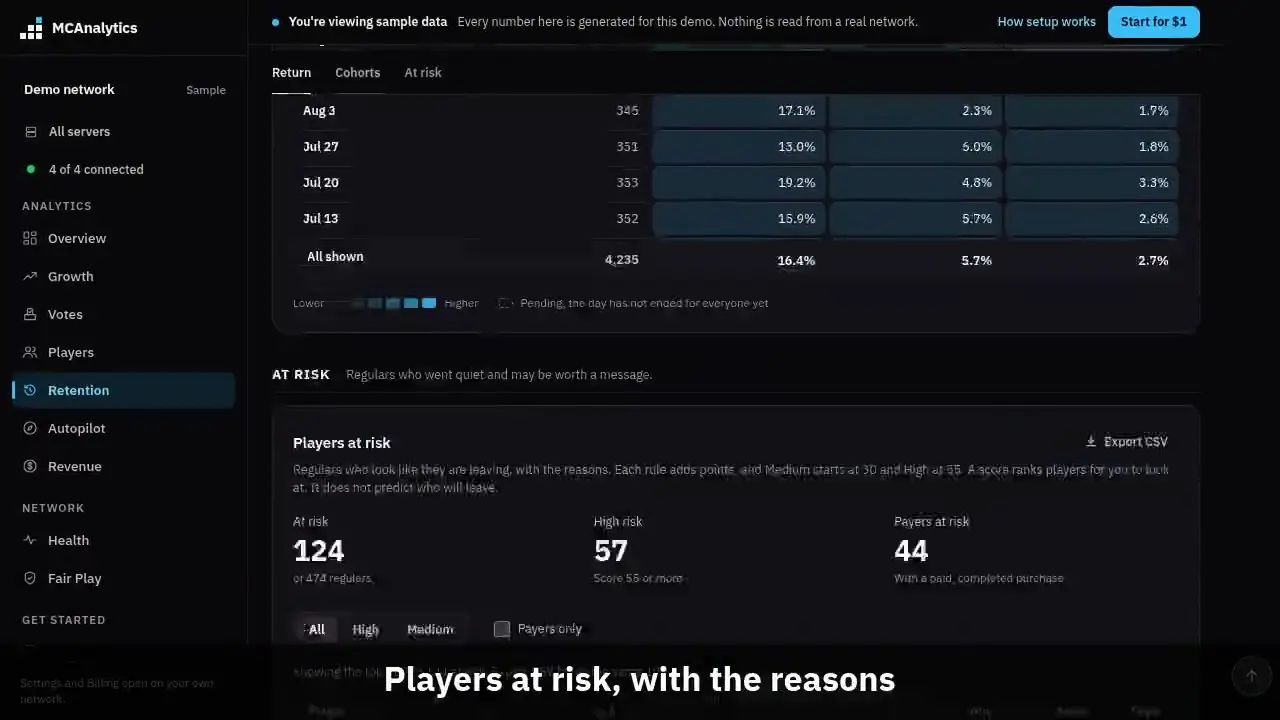
The clip shows, in order:
- Return by day, week or month.
- Pending means the day has not ended.
- Players at risk, with the reasons.
- Payers at risk are counted.
- Every point has a rule.
- Regulars gone quiet, week by week.
#How it works
The Retention page has two parts on the Network plan and up. The first is a cohort table: players grouped by the day, week or month they first joined, with the share who came back on Day 1, Day 7 and Day 30. The second is a list of players at risk: regulars who are playing less than they used to, with the reason beside each name.
Both parts use data the connector already sends. They read sessions, purchases, lag events and, where you run it, WorldGuard regions. There is no model that learns from your players and nothing to train.
On a lower plan the page keeps the return curve, the weekly cohort grid and the simple at risk list. Churn risk shows a locked card. Nothing is hidden or deleted, and the data shows as soon as you upgrade.
#Set it up
There is nothing to switch on. Open Retention in the sidebar and scroll to Cohorts and At risk.
- Use the Day, Week and Month links to change how first joins are grouped.
- Pick a source, identity or country and press Apply. The filters apply to the cohort table, the list, the counts and the trend. The server picker at the top of the dashboard applies too.
- In the list, switch between All, High and Medium, or tick Payers only. Export CSV saves what you see, with the reasons.
- For the spawn rule, install the WorldGuard region tracking described on the WorldGuard regions page. Without it the rule stays off and the others still work.
#The cohort table
A cohort is every player whose first join fell in that day, week or month. Weeks start on Monday and months on the first, in UTC. The table shows the last 28 days, 12 weeks or 6 months.
A cell is the share of the cohort who started a session that counts as a return during that numbered day. Day 7 is the seventh day only. A numbered day is the 24 hours that begin that many days after the player's own first join, so it never depends on a time zone.
A player is counted in a cell only once their own day has ended. A cohort nobody has finished the day for shows Pending, never 0%. The last row, All shown, adds up every cohort in the table. It is a sum of players, not an average of the rows, so a small week does not count as much as a large one.
The colour is one blue scale from lower to higher. A dashed cell is pending.
| Setting | Value |
|---|---|
| Cohort sizes | Day, week, month |
| Rows shown | 28 days, 12 weeks, 6 months |
| Days read | Day 1, Day 7, Day 30 |
| A player counts once | Their own day has ended |
| Filters | Source, server, identity, country |
#How the risk score works
A regular is a player who is not banned and played on 3 or more separate UTC days in the last 30. Each regular gets points from five rules. The points add up to a score from 0 to 95. A score of 30 or more is Medium, 55 or more is High, and both count as at risk. Below 30 the player is not listed.
Every player in the list shows the rules that fired and the points each added, so you can see why before you send a message.
| Rule | What it checks | Points |
|---|---|---|
| Away longer than usual | Days since the last session against the player's usual gap between play days. 1.5 times, 2, 3 and 4 times or more. Needs at least 2 days away. | 10, 22, 32, 40 |
| Playing on fewer days | Play days in the last 14 against the 14 day average of the 28 days before. A drop of 25, 50 and 75 percent. Needs 3 play days before. | 7, 14, 20 |
| Shorter sessions | The newest 3 sessions against the ones before. Down to 80, 60 and 40 percent. Needs 3 earlier sessions. | 5, 10, 15 |
| Never left spawn | WorldGuard region events in the last 60 days show only the spawn region. Skipped when the player has none. | 10 |
| Played through lag | Sessions in the last 14 days that overlapped a lag event on the same server. 1 session, then 2 or more. | 5, 10 |
#Payers, and what the score is not
Whether a player is a payer is shown and counted, but it adds no points. A payer is not more likely to leave. They are worth more to keep. So the card counts payers at risk, a Payers only switch narrows the list, and payers come first among players with the same score.
A payer is a player with a completed store purchase that paid more than nothing, matched to them by premium UUID. A refunded or free order does not count. A purchase that matched nobody is never guessed onto a player by name.
The weights were set by hand and checked on sample data and on test players built to behave in known ways. Those checks show the score rises when the signals get worse. They do not show how well the score picks out the players who really leave on your network, and we have not measured that. Treat the score as a way to order a list for a person to read, not as a forecast.
#Regulars gone quiet
The trend card counts, at the end of each of the last 9 weeks, the regulars who were away at least 2 times their usual gap, the ones away 4 times or more, and the payers among the first.
It uses the away rule only, because the other rules need data that is not kept per week. So it can read lower than the list. Use it to see whether the count is going up or down, not to match the list.
#Limits
- The list shows the top 100 at risk and says when there are more. Export CSV holds the same 100.
- A network with more than 20,000 regulars is scored on the 20,000 most recently active, and the card says so.
- Sessions with no length, such as one still open, are left out of the session length rule.
- The spawn rule needs WorldGuard region events and looks for a region named spawn.
- The lag rule needs lag profiling to be on. Lag profiling is a Network plan feature.
- Banned players are never listed. They did not drift away.
- Days are UTC days. A player who last played 3 hours ago on the previous UTC day is 1 day away.